Hi there, since 3.5 WordPress use new version of WordPress media library (uploader and browser). It’s faster and more convenient than older version which was using iframe. But I found some issue with layout, I think it should be better in user experience. The current media browser is focus on multiple images on the left, it has more space, whereas the media sidebar only have 267px in width. This is ineficient especially when you want to add long text on the picture caption or description. At least it’s my experience.
So, I made some CSS fix on it. See figures below:
Before:
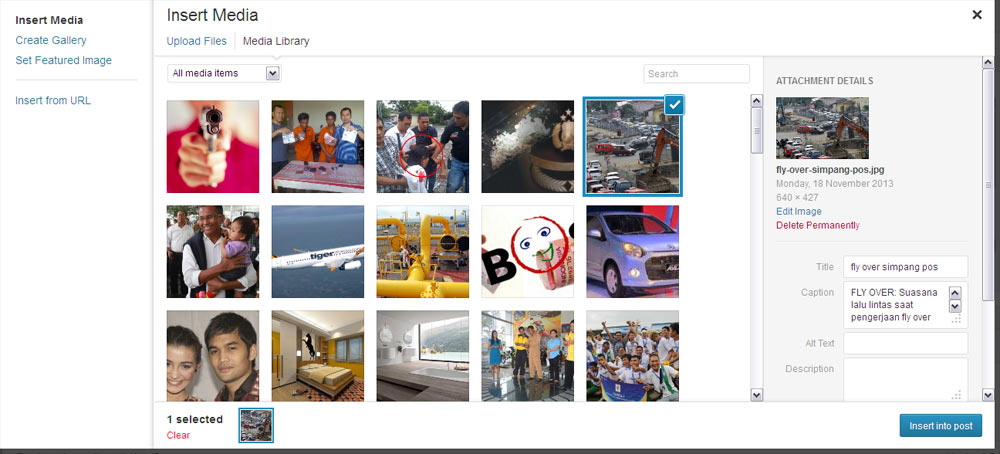
WordPress media library
After:
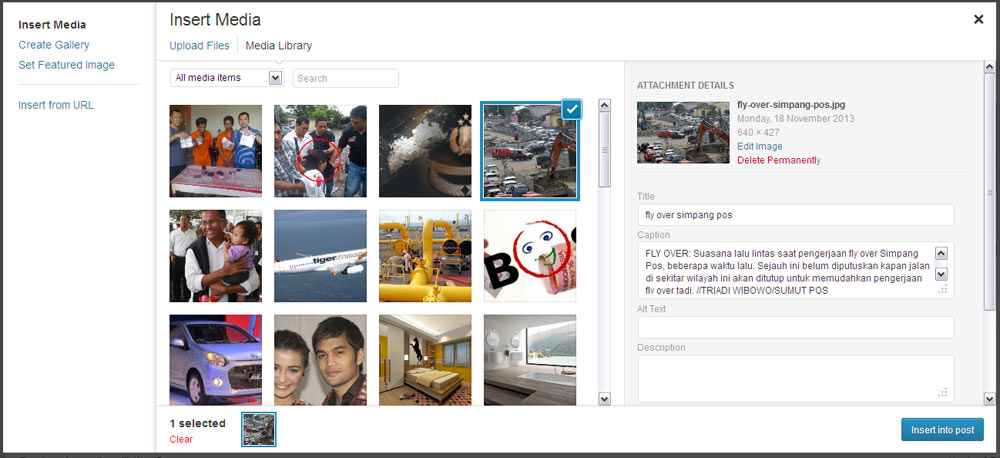
WordPress media library after fix
Changes:
- Media sidebar is now 450px, previously 267px
- Textarea, input, on sidebar is now 100% width
- Label is now block
- Removed float on search textbox, it’s now on the left, next to media filter dropdown
- Insert into post button remains on the right
Code:
Here is the code, put it somewhere in your functions.php file of your current theme.
add_action('admin_head','takien_media_browser_fix');
function takien_media_browser_fix () {
global $pagenow;
//if( 'post.php' !== $pagenow ) return;
if( !in_array( $pagenow, Array( 'post.php','post-new.php')) ) return;

	?>
	<style type="text/css">
	.media-sidebar {
		width:450px !important;
	}

	.attachments-browser .attachments,
	.attachments-browser .uploader-inline {
		right: 500px !important
	}

	.media-sidebar .setting input, .media-sidebar .setting textarea {
		float:none !important;
		width:95% !important
	}
	.media-sidebar .setting span, .compat-item label span,
	.media-toolbar-primary {
		float:none !important
	}
	.media-toolbar-primary {
		float:none !important
	}

	.media-toolbar-primary .button-primary {
		float:right !important
	}
	</style>
<?php
}
Komentar (1)
Arsip Statis