What Is Scrollbar?
According to Wikipedia, A scrollbar is an object in a graphical user interface (GUI) with which continuous text, pictures or anything else can be scrolled including time in video applications, i.e., viewed even if it does not fit into the space in a computer display, window, or viewport. It was also known as a handle in the very first GUIs.
What Is jScrollPane?
jScrollPane is a cross-browser jQuery plugin by Kelvin Luck which converts a browser’s default scrollbars (on elements with a relevant overflow property) into an HTML structure which can be easily skinned with CSS.
jScrollPane is designed to be flexible but very easy to use. After you have downloaded and included the relevant files in the head of your document all you need to to is call one javascript function to initialise the scrollpane. You can style the resultant scrollbars easily with CSS or choose from the existing themes. There are a number of different examples showcasing different features of jScrollPane and a number of ways for you to get support.
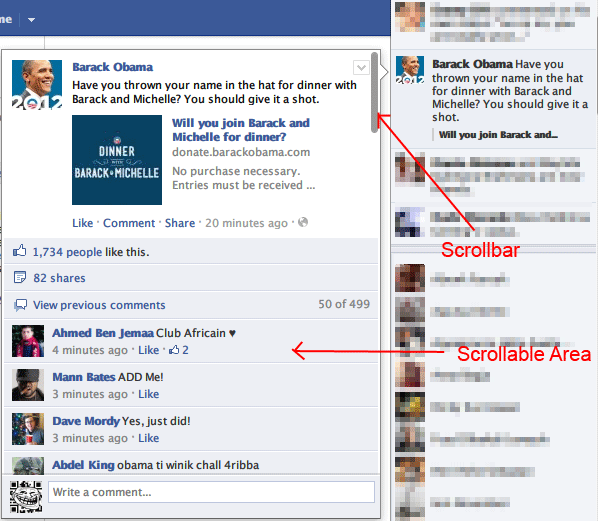
What Is Facebook ScrollableArea?

Recently, Facebook ScrollableArea can be found in many part of Facebook user interface to handle overflow content. One is in the activity feed in the top right area with a cute scrollbar that can be scrolled by dragging and mouse scroll.
Yes, it can be done nicely — with little CSS and JavaScript customization — using jScrollPane I mentioned above
jScrollPane + (JavaScript + CSS) = Facebook ScrollableArea
Don’t worry, there is no pain coding needed to do this, just follow this steps:
1. Include jScrollPane library and jQuery (if not yet) to your page
<!-- styles needed by jScrollPane -->
<link type="text/css" href="style/jquery.jscrollpane.css" rel="stylesheet" media="all" />

<!-- latest jQuery direct from google's CDN -->
<script type="text/javascript" src="http://ajax.googleapis.com/ajax/libs/jquery/1.4.2/jquery.min.js">
</script>

<!-- the mousewheel plugin - optional to provide mousewheel support -->
<script type="text/javascript" src="script/jquery.mousewheel.js"></script>

<!-- the jScrollPane script -->
<script type="text/javascript" src="script/jquery.jscrollpane.min.js"></script>
2.Initialize jScrollPane to your selector.
By default, the following code is ready to convert your scrollbar to jScrollPane.
$(function() {
	$('.content-area').jScrollPane();
});
But here, we need more settings. It’s should look like this:
$('.content-area').jScrollPane({
	horizontalGutter:5,
	verticalGutter:5,
	'showArrows': false
});
3. Scrollbar should be hidden if no mouse over on it.
So, we use .fadeIn() and .fadeOut() jQuery effects:
$('.jspDrag').hide();
$('.jspScrollable').mouseenter(function(){
    $(this).find('.jspDrag').stop(true, true).fadeIn('slow');
});
$('.jspScrollable').mouseleave(function(){
    $(this).find('.jspDrag').stop(true, true).fadeOut('slow');
});
4. Last but not least, add custom CSS
–
/*scrollpane custom CSS*/
.jspVerticalBar {
	width: 8px;
	background: transparent;
	right:10px;
}

.jspHorizontalBar {
	bottom: 5px;
	width: 100%;
	height: 8px;
	background: transparent;
}
.jspTrack {
	background: transparent;
}

.jspDrag {
	background: url(images/transparent-black.png) repeat;
	-webkit-border-radius:4px;
	-moz-border-radius:4px;
	border-radius:4px;
}

.jspHorizontalBar .jspTrack,
.jspHorizontalBar .jspDrag {
	float: left;
	height: 100%;
}

.jspCorner {
	display:none
}
We use a 1×1 pixel PNG transparent image for jspDrag background, Download it here (right click, save link/target)

Live Demo
Komentar (12)
Arsip Statis